> ## Documentation Index
> Fetch the complete documentation index at: https://docs.cloud.vessl.ai/llms.txt
> Use this file to discover all available pages before exploring further.
# Create a batch job
> Create a batch job from the console or with vesslctl.
## Overview
A job runs a command in a container and exits when the command finishes. Use it for training, inference, and batch processing workloads.
There are three ways to create a job:
* **Console** — fill in the **Create Job** form and submit. Best for your first few jobs.
* **CLI** — run `vesslctl job create`. Best for automation, scripting, and reproducible runs.
* **Convert a workspace** — clone a workspace's image, resource spec, and volumes into a job. See [Convert a workspace to a Job](/member/workspace/convert-to-job).
## Prerequisites
* **Available credit balance**: Job creation is blocked when the balance is zero or negative. Add a payment method and top up from [Billing](/admin/billing/credits).
* **(CLI only) Authenticated `vesslctl`**: Run `vesslctl auth login` to complete the browser OAuth flow. See the [CLI Quickstart](/cli/quickstart#prerequisites) for the full setup.
* **(Optional) Persistent volume for outputs**: Create an [Object storage or Cluster storage volume](/member/volume/create) ahead of time if you need to keep model checkpoints or other artifacts.
## Create from the console
Open **Jobs** in the sidebar and click **Create Job**, then fill in the form. Most fields match the workspace creation flow — a job adds a command to run and drops the interactive pieces (SSH, ports).
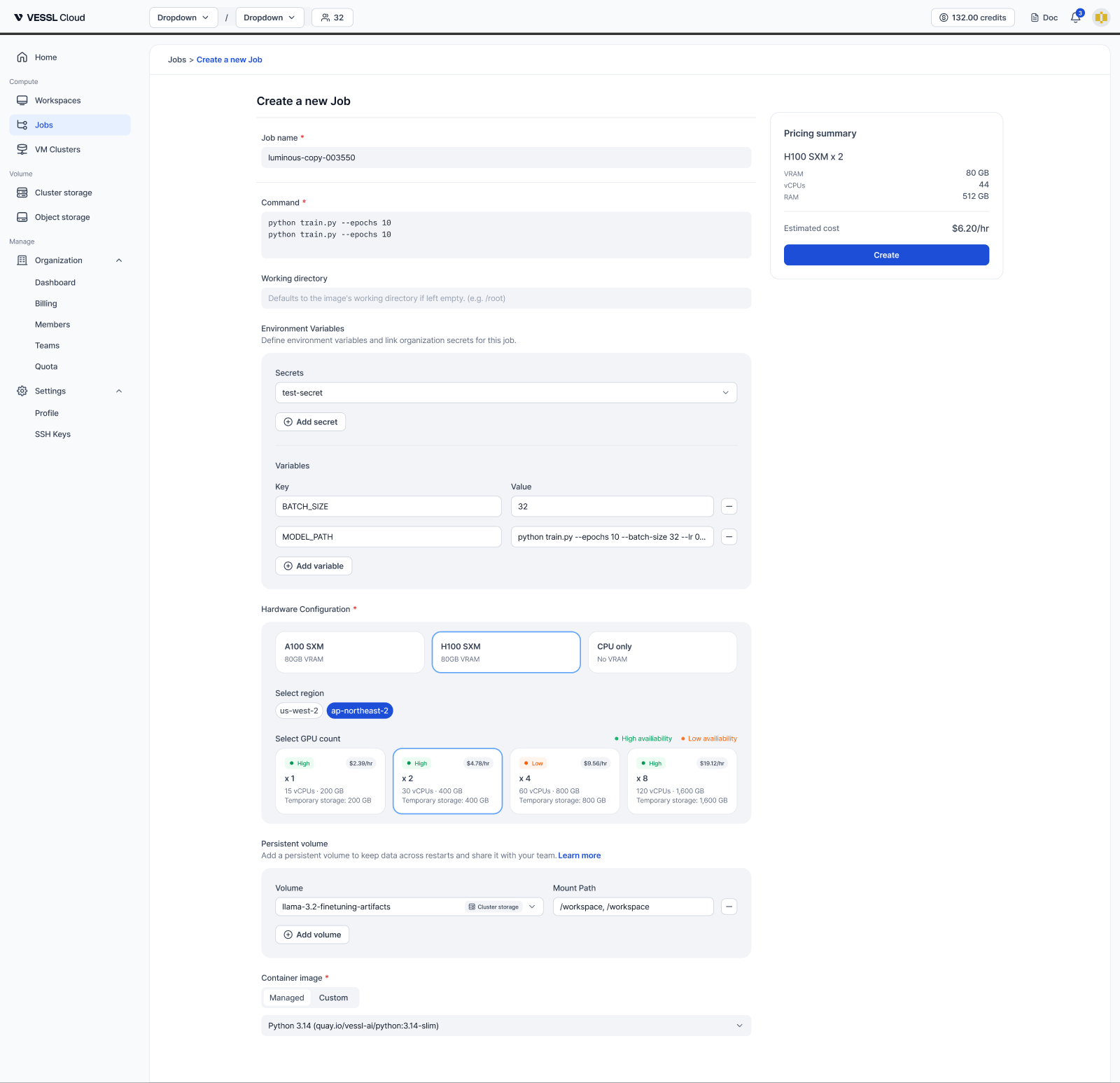 Example: the Create a new Job form
| Field | Description |
| -------------------------- | ------------------------------------------------------------------------------------------------------------------------------- |
| **Job name** | A name for the job. A random name is generated by default. |
| **Command** | The command that runs when the job starts, for example `python train.py --epochs 10`. |
| **Working directory** | (Optional) Where the command runs. Defaults to the image's working directory. |
| **Environment Variables** | Add key-value variables, and link [organization secrets](/admin/secrets/overview) instead of pasting credentials in plain text. |
| **Hardware Configuration** | Choose the GPU product (A100, H100, or CPU only), region, and GPU count. Each count shows its hourly price and availability. |
| **Persistent volume** | Attach an Object storage or Cluster storage volume with a mount path to keep data across runs. |
| **Container image** | A **Managed** image (PyTorch, CUDA, Python) or your own **Custom** image. |
Review the **Pricing summary** on the right and click **Create** to submit. You're taken to the job's detail page, where you can watch status, logs, and metrics.
## Create from the CLI
Provide a cluster, resource spec, container image, command to run, and any volumes or environment variables you need.
```bash theme={null}
vesslctl job create \
--name my-training-job \
--resource-spec \
--image quay.io/vessl-ai/torch:2.9.1-cuda13.0.1-py3.13-slim \
--cmd "python train.py --epochs 10" \
--env WANDB_API_KEY= \
--object-volume :/output \
--tag training-run-2026-04
```
Run `vesslctl cluster list` and `vesslctl resource-spec list` to discover available clusters and GPU specs. See [`vesslctl job create`](/cli/commands/job#create) for the full flag reference.
## Persist job output
Jobs run in ephemeral containers — anything written outside a mounted volume disappears when the job ends. Attach at least one Object storage or Cluster storage volume so your outputs survive.
* **Object storage** (`--object-volume`): Shared across clusters, ideal for final artifacts like trained models and evaluation metrics. Mount at a dedicated path such as `/output`.
* **Cluster storage** (`--cluster-volume`): Fast in-cluster storage, ideal for intermediate checkpoints during long training. Mount at `/workspace` or similar.
```bash theme={null}
vesslctl job create \
--name my-training-job \
--resource-spec \
--image quay.io/vessl-ai/torch:2.9.1-cuda13.0.1-py3.13-slim \
--object-volume :/output \
--cmd "python train.py --output /output"
```
Temporary storage is cleared when a job ends, even after `succeeded`. If your training script writes to `/tmp` or the current directory without a mounted volume, the results are lost.
## Reuse a job configuration
Export an existing job's configuration as JSON and resubmit it later:
```bash theme={null}
vesslctl job export my-job-abc123 > job-config.json
vesslctl job create --file job-config.json
```
## Submit a job from inside a workspace
Workspaces ship with `vesslctl` pre-authenticated with a workload token, so you can iterate on a script in JupyterLab and submit the same code as a batch job from the same shell. See [`vesslctl workspace`](/cli/commands/workspace#create) for details.
## See also
* [Convert a workspace to a Job](/member/workspace/convert-to-job)
* [List batch jobs](/member/job/list)
* [View job details](/member/job/details)
* [Create a volume](/member/volume/create)