Creating, updating, and deleting secrets requires the Organization admin role. Anyone in the organization can reference an existing secret by name when creating a job.
A secret is an encrypted, organization-scoped credential — an API token, password, database URL, or any other sensitive string. Use secrets instead of pasting plaintext into commands, image configs, or repo files. At runtime, VESSL Cloud injects the secret into your container as an environment variable. The value is encrypted on your machine before it’s sent, kept out of request bodies and access logs, and stored only as ciphertext.
VESSL Cloud has completed a SOC 2 Type II security attestation. See trust.vessl.ai for the full report and our security posture.
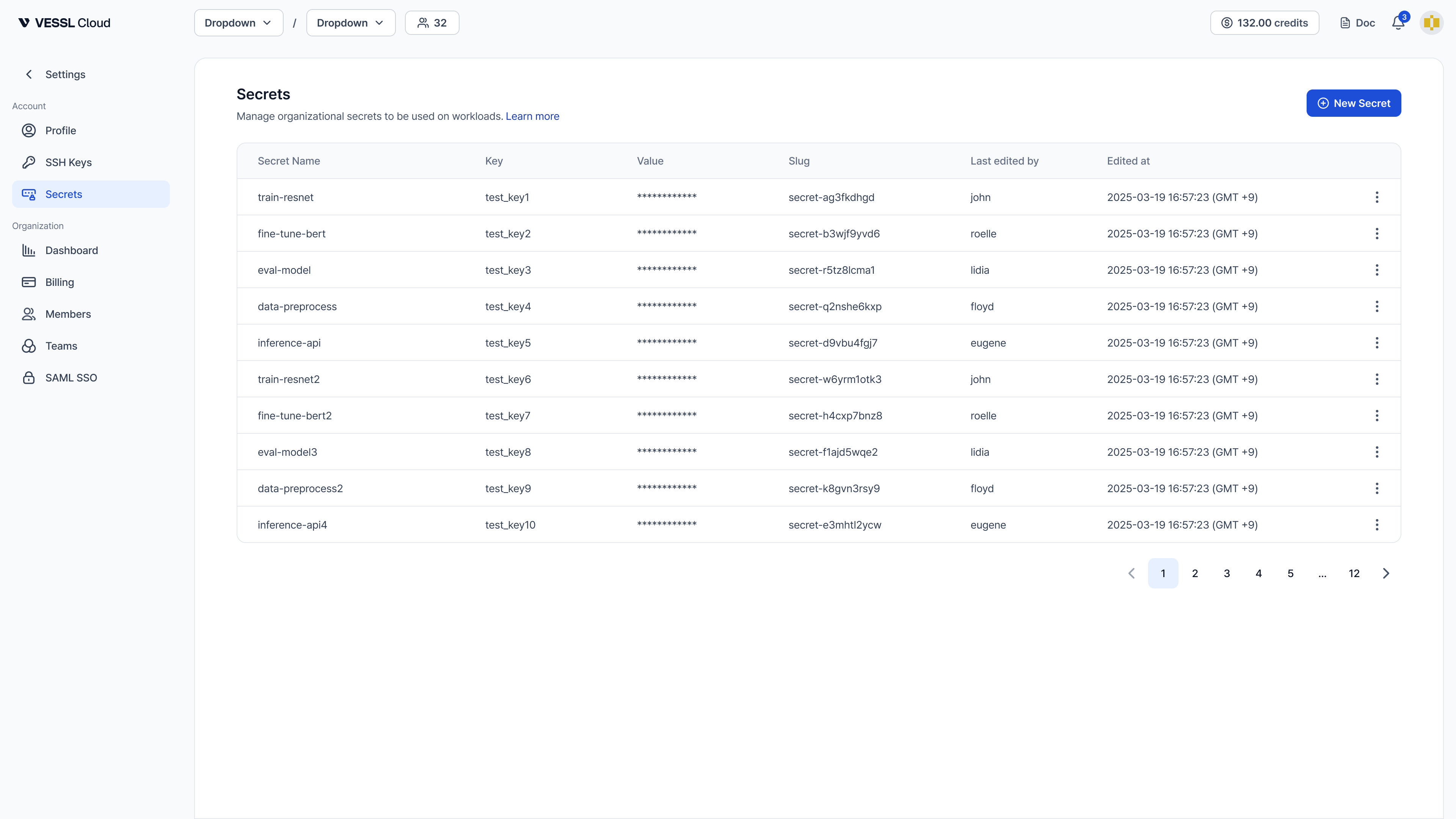
Secrets management page with a table of secrets showing Secret Name, Key, masked Value, Slug, Last edited by, and Edited at columns, plus a New Secret button

Common use cases

Env varUsed for
HF_TOKENHugging Face
OPENAI_API_KEYOpenAI
ANTHROPIC_API_KEYAnthropic
WANDB_API_KEYWeights & Biases
GITHUB_TOKENGitHub
DATABASE_URLDatabase connection string

How it works

  • Encrypted before it leaves your machine — when you create a secret, the value is sealed with your organization’s public key locally (libsodium sealed-box), so the plaintext never appears in request bodies or access logs. VESSL Cloud re-encrypts it at rest with a master key and stores only the ciphertext.
  • Injected at submission time — when you submit a workload, VESSL Cloud decrypts the value server-side and delivers it to your container as a Kubernetes Secret, surfaced as an environment variable when your container starts.
  • Write-only values — after a secret is saved, VESSL Cloud never shows its value again to anyone, member or admin; the list and detail views show only metadata. To change a value, an admin rotates it by overwriting it with a new one — the previous value can’t be retrieved.
  • Organization-scoped — secrets are shared across all teams in the organization. Every job in the org can reference any secret by name.
  • Admin-managed — only Organization admin can create, update, or delete a secret. Members can see secret names and metadata and reference a secret by name in a workload.
  • Soft delete — deleted secrets are kept for audit; their names become available for reuse immediately.
Watch a short demo of creating, editing, and deleting a secret on VESSL Cloud.

Create a secret

A secret has three core fields:
FieldWhat it is
NameYour identifier for the secret. Unique per organization.
KeyThe default env var name when the secret is injected into a workload. Must match ^[A-Za-z_][A-Za-z0-9_]*$ (env-var format, ≤256 chars).
ValueThe plaintext credential. Encrypted before it leaves your machine.
Keep Name and Key identical (HF_TOKEN/HF_TOKEN) for simplicity, or use a different Name when you need multiple secrets that share the same env var — for example hf-prod and hf-staging, both with key HF_TOKEN.

GUI

  1. Open Organization > Secrets in the sidebar.
  2. Click New secret.
  3. Fill in Name, Key, Value, and an optional Description.
  4. Click Create.
Create new Secret modal with Secret name, Key, and Value fields, plus Cancel and Create buttons

CLI

# Interactive masked prompt (when stdin is a TTY)
vesslctl secret create HF_TOKEN HF_TOKEN

# Read the value from an env var
vesslctl secret create HF_TOKEN HF_TOKEN --from-env LOCAL_HF_TOKEN

# Read from stdin
echo "$HF_TOKEN" | vesslctl secret create HF_TOKEN HF_TOKEN --from-stdin

# Add a description
vesslctl secret create HF_TOKEN HF_TOKEN -d "Hugging Face token (prod)"
The plaintext value never appears on the command line — --from-env and --from-stdin keep it out of your shell history.

Use a secret in a job

GUI

In the Environment Variables section of the job-create form, pick a secret from the Secrets dropdown. Click Add secret to attach more. Plain variables and secrets coexist, but if a plain variable uses the same env-var key as a secret, the plain variable’s value takes precedence.
Environment Variables section of the job-create form with a Secrets dropdown, an Add secret button, and a Variables table for plain key-value pairs

CLI

Inject one or more secrets into a job with --secret:
# Inject as env var HF_TOKEN, referencing the secret named HF_TOKEN
vesslctl job create ... --secret HF_TOKEN

# Inject as env var OPENAI_API_KEY, referencing the secret named openai-prod
vesslctl job create ... --secret OPENAI_API_KEY=openai-prod

# Multiple secrets
vesslctl job create ... --secret HF_TOKEN --secret OPENAI_API_KEY
  • --secret NAME injects the secret as an env var with the same name.
  • --secret KEY=NAME injects the secret as env var KEY, referencing the secret named NAME.
  • If the same env-var key appears in both --env and --secret, the plaintext --env value takes precedence.
Workspaces don’t support secret injection yet. Secrets ship for jobs today; workspace support is on the roadmap.

Update a secret

Rotate the value, rename the env-var key, or edit the description:
# Rotate the value (interactive prompt)
vesslctl secret update <slug>

# Rotate the value from an env var
vesslctl secret update <slug> --from-env NEW_HF_TOKEN

# Rename the env-var key (metadata-only, no value rotation)
vesslctl secret update <slug> --key NEW_KEY

# Edit the description
vesslctl secret update <slug> --description "Rotated 2026-05"
Running workloads do not pick up updated secret values automatically. Restart the workload to use the new value.

List and delete secrets

# List active secrets
vesslctl secret list

# Include soft-deleted entries
vesslctl secret list --include-deleted

# Delete (with confirmation)
vesslctl secret delete <slug>

# Delete without confirmation
vesslctl secret delete <slug> -y

FAQ

Only Organization admin users can create, update, or delete secrets. Members can see secret names and metadata and reference a secret by name when creating a job — they don’t need admin access to use one. (A saved value can’t be viewed again by anyone, member or admin; this isn’t a member-only limit.)
The value is sealed with your organization’s public key on your machine (libsodium sealed-box) before it’s sent, so the plaintext never appears in request bodies or access logs. VESSL Cloud stores only the ciphertext — re-encrypted at rest with a master key — and decrypts it server-side only to inject it into your workload when you submit a job. Access is governed by our SOC 2 Type II controls.
Name is your identifier (unique per organization). Key is the env-var-shaped reference used by default when injecting into a workload. Keep them identical for simplicity (HF_TOKEN/HF_TOKEN), or use distinct names when you need multiple secrets that map to the same env var (for example, hf-prod and hf-staging, both with key HF_TOKEN).
The plaintext --env KEY=value takes precedence — its value is used and the --secret KEY=name reference for the same key is ignored.
No. Secrets are injected at container start. Restart the workload to pick up the new value.
Yes. Deleted secrets are soft-deleted, so the name becomes available immediately. Pass --include-deleted to vesslctl secret list to inspect the history.