

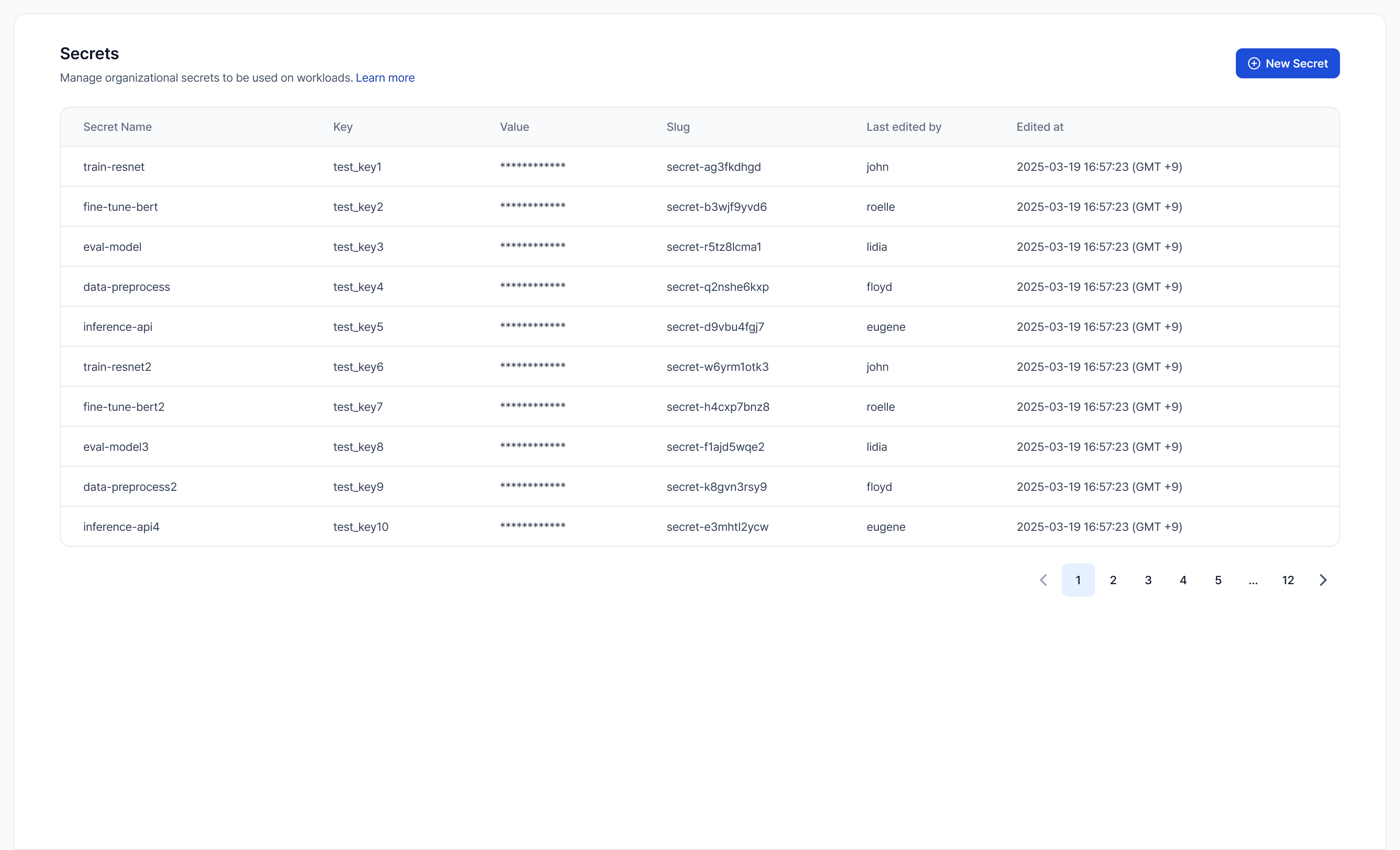
Anyone in the organization can view secrets, create new ones, and reference a secret by name when creating a batch job. Updating or deleting a secret requires the Organization admin role — see Manage secrets.
VESSL Cloud has completed a SOC 2 Type II security attestation. See trust.vessl.ai for the full report and our security posture.
Common use cases
How it works
- Encrypted before it leaves your machine — when you create a secret, the value is sealed with your organization’s public key locally (libsodium sealed-box), so the plaintext never appears in request bodies or access logs. VESSL Cloud re-encrypts it at rest with a master key and stores only the ciphertext.
- Injected at submission time — when you submit a workload, VESSL Cloud decrypts the value server-side and delivers it to your container as a Kubernetes Secret, surfaced as an environment variable when your container starts.
- Write-only values — after a secret is saved, VESSL Cloud never shows its value again to anyone, member or admin; the list and detail views show only metadata. To change a value, an admin rotates it by overwriting it with a new one — the previous value can’t be retrieved.
- Organization-scoped — secrets are shared across all teams in the organization. Every batch job in the org can reference any secret by name.
- Open to create, admin-gated to change — anyone in the organization can view secrets and create new ones. Only Organization admin can update or delete a secret, including secrets that members created; members don’t see the edit and delete controls on the secrets list.
Create a secret
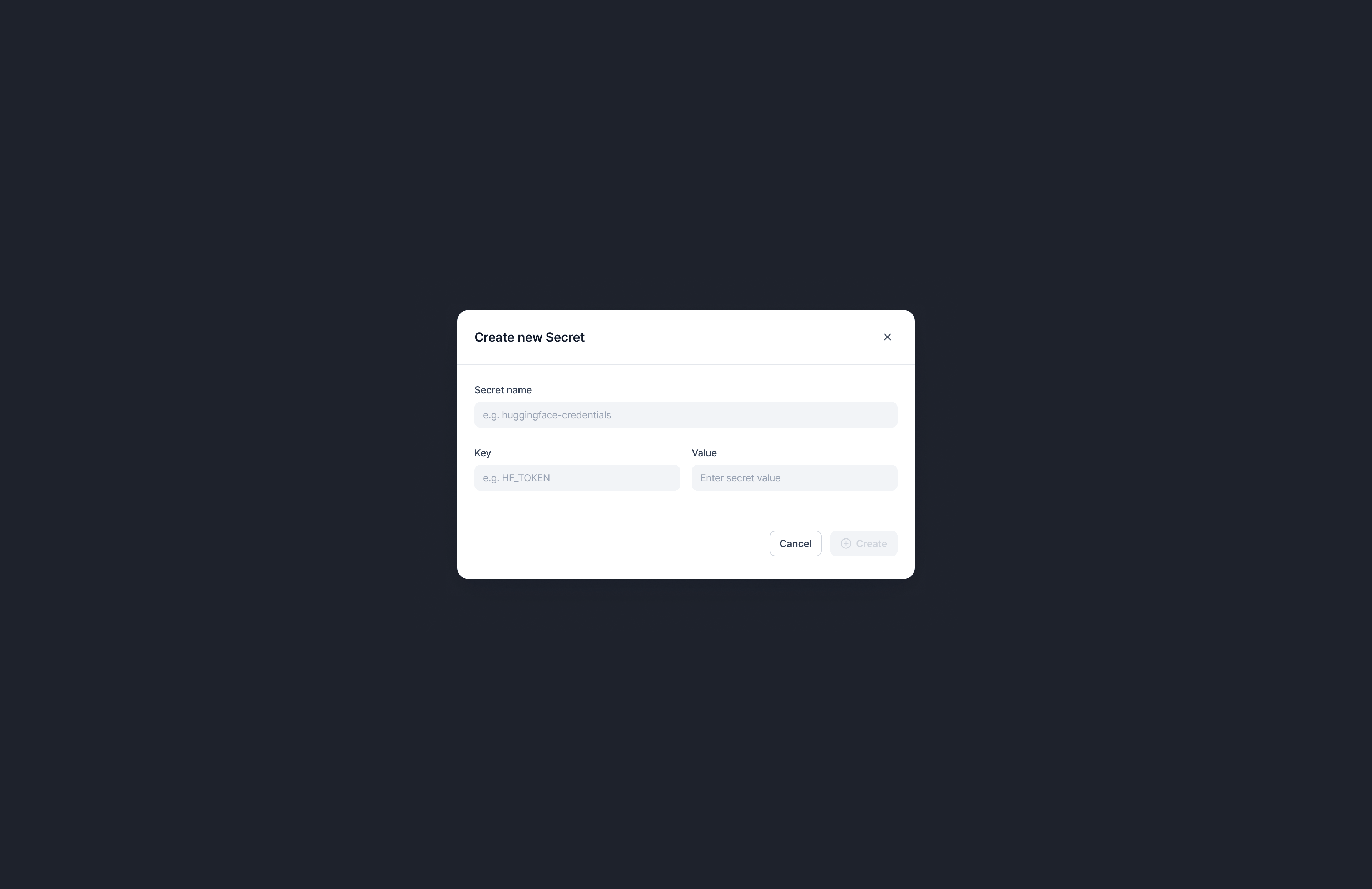
A secret has three core fields:
Keep Secret name and Key identical (
HF_TOKEN/HF_TOKEN) for simplicity, or use a different Secret name when you need multiple secrets that share the same env var — for example hf-prod and hf-staging, both with key HF_TOKEN.
GUI
- In the sidebar, select Settings.
- Select Secrets under Account.
- Click New Secret.
- Fill in Secret name, Key, and Value.
- Click Create.
CLI
--from-env and --from-stdin keep it out of your shell history.
Use a secret in a job
GUI
In the Environment variables section of the job-create form, pick a secret from the Secrets dropdown. Click Add secret to attach more. Plain variables and secrets coexist, but if a plain variable uses the same env-var key as a secret, the plain variable’s value takes precedence.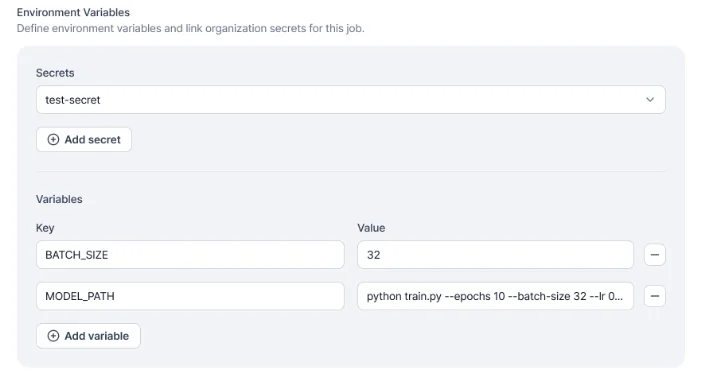
CLI
Inject one or more secrets into a batch job with--secret:
--secret NAMEinjects the secret as an env var with the same name.--secret KEY=NAMEinjects the secret as env varKEY, referencing the secret namedNAME.- A key can’t appear in both
--envand--secret— the CLI rejects the command, so pick one flag per env var.
Workspaces don’t support secret injection yet. Secrets ship for jobs today; workspace support is on the roadmap.
List secrets
FAQ
Who can manage secrets?
Who can manage secrets?
Anyone in the organization can view secrets and create new ones. Updating or deleting a secret — including one you created yourself — requires the Organization admin role, so members don’t see the edit and delete controls on the secrets list. Members can reference a secret by name when creating a batch job — they don’t need admin access to use one. (A saved value can’t be viewed again by anyone, member or admin; this isn’t a member-only limit.)
How does VESSL Cloud protect my secret value?
How does VESSL Cloud protect my secret value?
The value is sealed with your organization’s public key on your machine (libsodium sealed-box) before it’s sent, so the plaintext never appears in request bodies or access logs. VESSL Cloud stores only the ciphertext — re-encrypted at rest with a master key — and decrypts it server-side only to inject it into your workload when you submit a job. Access is governed by our SOC 2 Type II controls.
Why are Secret name and Key separate fields?
Why are Secret name and Key separate fields?
Secret name is your identifier (unique per organization). Key is the env-var-shaped reference used by default when injecting into a workload. Keep them identical for simplicity (
HF_TOKEN/HF_TOKEN), or use distinct names when you need multiple secrets that map to the same env var (for example, hf-prod and hf-staging, both with key HF_TOKEN).What happens if --env and --secret use the same env-var key?
What happens if --env and --secret use the same env-var key?
The CLI rejects the command —
vesslctl job create errors when a key appears in both flags, so pick one per env var. In the GUI, the two can coexist: a plain variable with the same key as a secret takes precedence, and the secret reference is ignored.Do running workloads see updated secret values?
Do running workloads see updated secret values?
No. Secrets are injected at container start. Restart the workload to pick up the new value.